Image to DXF converter.
Trace an image into vector geometry and export DXF for CAD, CNC and laser cutting, alongside SVG, PDF, EPS and AI. DXF comes with Pro, and every new account gets 7 days of Pro free.
.png.jpg.webp.gif
Drag images here to traceTap to choose images to tracePaste:⌘V
Trace preset:Balanced▼
Applies to images you add next — each one traces as it lands.
The SVG download is free — no account needed.
Transparent areas become white shapes, and larger images are scaled down to about 0.6 megapixels before tracing.
Your image is uploaded to pic2svg's own server to be traced. What we keep, and for how long
Other formats, plans and licences
PDF, EPS, AI (EPS-based) and DXF come with a paid plan, and every new account gets 7 days of Pro free. The free plan and Starter carry a personal-use licence; commercial use needs Pro, and resale needs Advanced — see the licence row on the pricing page.
Line art to vectors and DXF
Bracket line drawing
Input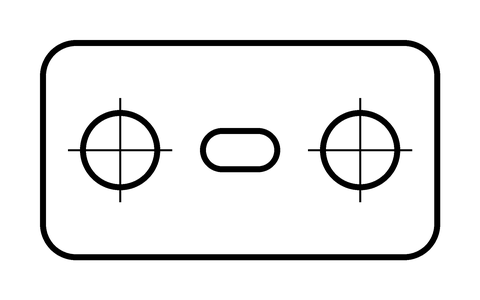
Traced SVG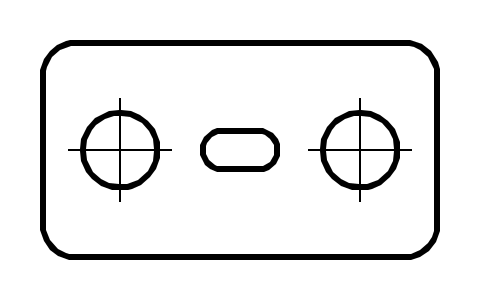
Image to DXF questions
- Can I use the DXF for laser cutting?
- Yes. The DXF of the bracket example above holds 16 closed polylines on one layer: the closed contours of the drawing, with each hole as its own contour and the image border left out. Type the width you need in DXF width (mm) under your result and the drawing is exactly that wide, the height following; left empty, it is 96 pixels per inch, so this example opens at 105.8 × 58.2 mm. There is no centerline tracing: a drawn line comes back as a thin closed outline, so a vector cut follows both of its edges.
- Can I convert a photo to DXF?
- You can trace a photo, but DXF is most predictable with clear shapes, icons, logos and line art intended for CAD or CNC work.
- Why is a DXF file larger than an SVG?
- DXF stores curves as sampled point lists, so a complex trace can produce many line segments even when the SVG stays compact.
- How detailed is the DXF?
- Curves are sampled into straight segments: 12 points per curve on Pro and 32 on Advanced. More points give smoother geometry and larger files. DXF export comes with Pro and Advanced, and with every new account's 7-day Pro trial; the SVG from the same trace is free.
- Does DXF require a separate image upload?
- No. The DXF is generated from the same SVG trace, so there is no second conversion service in the workflow.