Convert PNG to DXF.
Drop a PNG of a logo, part or line drawing here. pic2svg traces it into closed outlines and writes a DXF in millimetres that CAD, CNC and laser software can cut, with every hole as its own contour.
Trace preset:Balanced▼
Applies to images you add next — each one traces as it lands.
The SVG download is free — no account needed.
Transparent areas become white shapes, and larger images are scaled down to about 0.6 megapixels before tracing.
Your image is uploaded to pic2svg's own server to be traced. What we keep, and for how long
Other formats, plans and licences
PDF, EPS, AI (EPS-based) and DXF come with a paid plan, and every new account gets 7 days of Pro free. The free plan and Starter carry a personal-use licence; commercial use needs Pro, and resale needs Advanced — see the licence row on the pricing page.
A real PNG, traced to DXF
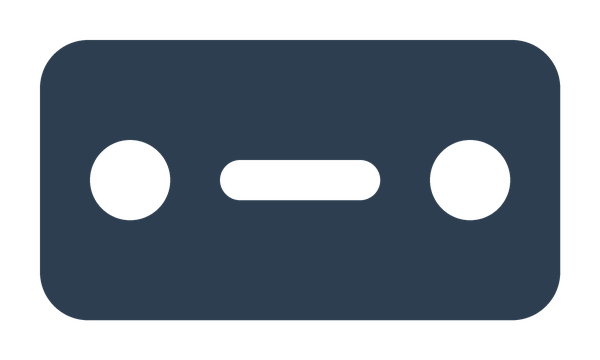
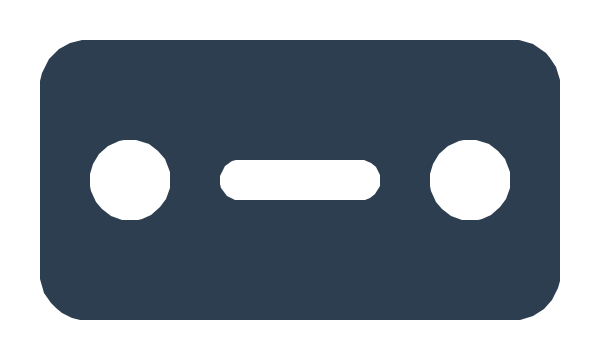
A mounting plate drawn for this page: one dark plate with two screw holes and a slot, on a transparent 600 × 360 canvas. Left is the PNG, right is the trace exactly as the engine wrote it.
Mounting plate, Balanced preset
Three steps to a clean DXF
- Step 1
Start from a sharp, high-contrast PNG
Solid shapes on a plain or transparent background trace best. Export at the largest size you have; the trace never adds detail the PNG does not have.
- Step 2
Check the preview
Every closed shape in the preview becomes a closed contour in the DXF. Look for stray specks or gaps before you download; the Compact preset merges near-identical colours.
- Step 3
Set the size, then download the DXF
Type the width you need in DXF width (mm) under the result; the height follows the drawing, and the width counts only what is cut, not the empty margin. Leave it empty to get the default size and scale it in your CAD, CNC or laser software instead.
What to know before you cut
Holes cut as holes
Every contour is its own closed polyline, so the inside of an O, a screw hole or a slot cuts cleanly instead of joining the outline.
Outlines, not centre lines
Lines in your PNG come back as thin filled shapes, so a vector cut follows both edges of a stroke. For single-line scoring, use a centre-line tool.
Photos are the wrong input
A photo is reduced to about 32 flat colour bands, whose stepped edges make a poor cut. Use a drawing, logo or silhouette, or engrave photos in your laser software's image mode.
Large images are scaled down
Images over about 600,000 pixels are scaled down before tracing, so the default DXF opens smaller in millimetres. A width typed in DXF width (mm) sets the real size anyway.
PNG to DXF questions
- How do I convert a PNG to DXF?
- Drop the PNG on this page. Transparent areas become white, the image is traced into filled shapes, and you see the result in seconds. Check the preview, type the width you need in DXF width (mm), then download the DXF.
- Is converting PNG to DXF free?
- Tracing, the preview and the SVG are free without an account. The DXF download needs Pro ($19.99 billed monthly, or $159 billed yearly, which is $13.25 a month) or Advanced; a free account starts 7 days of Pro, so you can try the DXF first. See pricing.
- What happens to my PNG's transparent background?
- It is filled with white before tracing. The SVG keeps a white background shape you can delete; the DXF leaves the image border out, so it holds only your artwork's contours.
- What units does the DXF use?
- Millimetres. Type a width in DXF width (mm) and the drawing (what is cut, without the margin) is exactly that wide, with the height following. Left empty, it is 96 pixels per inch: a drawing 600 px wide opens 158.75 mm wide.
- Which programs open the DXF?
- It is an AutoCAD R2010 DXF of closed LWPOLYLINE entities on one layer, a format CAD, CNC and laser programs commonly import. We have not tested every program's importer.
- Can I convert a JPG instead?
- Yes. The JPG to DXF converter includes a measured JPEG comparison and a contour preview to check before downloading.