Free tool · PNG sprites and pixel icons
Pixel art to SVG
Turn a small PNG sprite or pixel icon into real SVG rectangles. Keep square edges and transparent areas, without tracing curves or embedding the PNG. Free, no account; your file stays in this browser.
Still PNG · up to 512 × 512 pixels · 4 MB · processed locally
Files stay on your device.
PNG → SVG example


An 8 × 8 pixel heart, rebuilt as SVG rectangles. Try the example to download it and inspect its comparison receipt.
How the conversion works
Choose a still PNG at its native size. The tool reads the browser-decoded pixels, merges adjacent identical RGBA runs into rectangles and writes an SVG with the same dimensions and viewBox. Fully transparent pixels produce no shapes; partial transparency becomes fill-opacity. Download the SVG for vector geometry, or keep the PNG when your application wants a raster sprite.
What the comparison receipt checks
The exact exported SVG is rendered again at native size in this browser. The receipt compares alpha and premultiplied color against the decoded PNG, ignoring invisible RGB under zero alpha. It reports changed pixels and the largest channel difference on a 0–255 scale. This checks this browser at native size; it does not certify other editors, color profiles, printing or cutting. Differences are reported rather than hidden.
Colors, scaling and transparent edges
Browser decoding and canvas can round colors, especially at partial alpha: a stored channel value of 240 can become 239. The receipt compares decoded pixels, not the original PNG's stored palette or profile. SVG rectangles may show thin seams at fractional scales or in renderers that handle crispEdges differently. Test the file at its intended display size. Separate rectangles are not a united cutting outline.
Limits and when to keep the PNG
Use a still PNG up to 512 × 512 pixels and 4 MB. Animated PNGs are rejected; export one frame first. Output is capped at 16,384 rectangles and 4 MB to keep conversion and preview bounded. Noise, dithering and photographs can hit that cap. An SVG can be larger than the original PNG; the receipt shows both byte counts. This tool does not remove backgrounds, infer a smaller art grid or turn photographs into pixel art.
A tracer is a different job
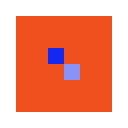
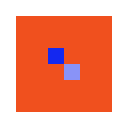
On 6 November 2026, the pic2svg engine CLI in sharp/spline mode converted our 8 × 8 diagnostic PNG into one filled path. At 16× nearest-neighbor size, sharp/polygon produced four paths (684 bytes) but flattened the transparent border to white. A native-size Chromium comparison found 7,424 of 16,384 pixels differed. That is documented tracing behavior, not a general quality score.
Inspect the original files: 8 × 8 PNG, 128 × 128 PNG and polygon trace SVG. The diagnostic PNG has a transparent border, one opaque blue pixel and one partially transparent blue pixel.

Need a different result?
For smooth outlines, use PNG to SVG tracing. Other inputs have their own converters: GIF, WebP and JPEG. Learn how to check whether an SVG is real vector, or inspect cutting geometry with the SVG cut-file checker.